EUDR at the Border: Getting Customs Declarations Right With the osapiens HUB

Starting December 30, 2026, every import of an EUDR-relevant product into the EU must carry proof of due diligence in the customs declaration. For most companies, the first EUDR customs declaration marks the moment when EUDR needs to turn into reliable daily operations.
The due diligence statement (DDS) has to be submitted, its reference number has to exist, and it has to reach whoever lodges the declaration before the goods arrive. If any link in that chain breaks, the shipment waits.
In brief
- What customs needs: a TARIC document code on every EUDR customs declaration. In the standard case that is C716 with the DDS reference number; exemptions and re-imports use their own codes.
- What’s at risk: if the number arrives late, goods wait in temporary storage. If a code is wrong, the importer risks fines and confiscation, even when a forwarder files the declaration.
- What this article covers: which codes and references your declaration needs, where EUDR fits into the import process, why exemptions make it complex, and how to get the right data to whoever files the declaration.
The osapiens HUB for EUDR automates the full chain:
- Collects exemption reasons and evidence from suppliers, each mapped to its TARIC code
- Traces products back to the origin, storing the records you need to prove a re-import or exemption
- Derives the right document code and reference number for every declaration
- Shares them with your customs team, forwarders and ERP before the goods arrive
- Keeps the documents ready when customs asks for proof
EUDR customs requirements: what changes at the border
TARIC codes and DDS reference numbers
If the goods you import are classified under a CN code listed in Annex I of the EUDR, the customs declaration must state either that a DDS exists or why none is required. Customs checks this against a condition stored in TARIC, the EU's integrated tariff database. If no valid document code is declared, customs refuses the import.
In the standard case, three pieces of information connect your due diligence to the declaration:
- The commodity code: Imports are declared with the 10-digit TARIC code. Annex I lists products by their 8-digit CN code for each product you are importing.
- The TARIC document code C716: It sits in the documents section of the declaration and confirms to customs that you hold the required due diligence statement.
- The DDS reference number: It goes into the document reference field next to C716. The EU Information System (TRACES) issues it only after the DDS is submitted, as a 14-character identifier. TRACES also issues an 8-character verification number. The declaration has no field for it, but customs brokers often ask for it to check the DDS.
The reference number exists only once your due diligence is complete and the DDS is submitted. That makes timing the critical path: no DDS, no reference number, no clearance.
Where EUDR fits into the customs process
It helps to see where this sits in the import process. Before the goods leave the country of origin, the carrier files an entry summary declaration for security screening. On arrival, the goods are presented to customs and go into temporary storage at the port or terminal. Only then are they released for free circulation, through the customs declaration lodged by you or your customs representative, carrying the tariff code, value, origin, procedure and required documents.
The declaration is filed electronically in each Member State's customs system: ATLAS in Germany, AIS in Ireland, DMS in the Netherlands. Alongside the tariff code, customs value, origin and procedure code, it lists required documents and certificates as document codes, and that is where C716 and the DDS reference number go. So the EUDR data must be in the hands of whoever files the declaration, in a form they can enter into that system, the moment the declaration is lodged.
Multiple DDS references and supporting documents
One detail matters for EUDR: customs data is declared per goods item and one goods item can carry several pairs of document code and reference number. Two C716 entries for two DDS are allowed, and so is C716 next to Y129 when part of a product is out of scope.
In practice, that is often before the goods arrive. For sea freight, brokers commonly pre-lodge declarations days ahead of the vessel so the goods clear on arrival. If the reference number is not there by then, the goods sit in temporary storage until it is.
What happens if your DDS reference number is missing or incorrect
If the reference number is missing, or the TARIC document code does not fit the goods, customs does not release the shipment. The goods sit in temporary storage at the port or border while you fix the declaration, and storage, demurrage and missed production slots add cost every day. If competent authorities suspect non-compliance, they can also ask customs to suspend release under Article 26 of the EUDR.
Errors found later are just as costly. A wrong exemption code or a DDS that does not cover the goods counts as a breach. Under Article 25, Member States must set maximum fines of at least 4% of annual EU-wide turnover, alongside confiscation of the goods and the revenue from them, temporary exclusion from public procurement and temporary bans on placing products on the market (Regulation (EU) 2023/1115). A missing DDS reference number can delay customs clearance and increase costs, while an incorrect reference or exemption code can expose the importer to regulatory penalties.
Why EUDR customs declarations get complicated
For most shipments containing goods in scope of EUDR, the requirement is straightforward: importers must provide TARIC document code C716 together with the corresponding DDS reference number. The difficulty lies in making sure the DDS you declare actually covers the goods in that shipment. Product, quantity, supplier and plot data must at least be covered by the DDS.
Understanding EUDR TARIC document codes and exemptions
Then come the exceptions. The DG TAXUD TARIC defines the document codes, for cases where a different number, or no number at all, applies. The codes most relevant for imports:
| Code | When it applies | What goes next to it |
| C716 | Standard case: a DDS exists | DDS reference number |
| C717 | Micro or small primary operator with a simplified declaration (Art. 4a) | Simplified declaration identifier |
| C718 | Re-import of goods placed on the EU market during the transition period | Conventional reference number 99EU9999999999 |
| C720 / C725 | Re-import of goods already placed on the EU market: C720 if you are a non-SME, C725 if you are an SME | Upstream DDS reference numbers, or 22EU2222222222 if none was received |
| Y129 | The CN code is an "ex" code and these goods are out of scope | No number |
| Y132 | Produced before June 29, 2023 (Art. 1(2)) | No number |
| Y133 | Used, second-hand, waste or recycled material | No number |
| Y141 | Micro or small undertaking established by | No number |
| Y187 | Samples of negligible value, or goods for examination, analysis or tests | No number |
| Y190 | Packing material and containers supporting another product | No number |
| Y191 | Inputs to medicinal products; correspondence and marketing material | No number |
Different products within the same shipment may require different TARIC document codes. For example, a paper shipment might contain virgin-fiber grades requiring C716 and recycled grades qualifying for Y133. The right code depends on the goods, your role and your company size, so it cannot be hard-coded once in master data and forgotten. Much of the evidence for an exemption, such as recycled content or production date, sits with the supplier and has to be collected from them.
Getting the right DDS reference number to the right person
The company that does the due diligence is often not the one that types the declaration. Importers typically work in one of three setups:
- In-house customs team: Your own trade compliance staff lodge the declaration and need DDS data inside their customs software.
- Supplier-prepared declaration: Under some delivery terms, the supplier or its agent handles clearance and needs your DDS reference numbers.
- Freight forwarder or customs broker: The most common case. The forwarder lodges the declaration and needs the DDS before the goods arrive.
In every setup, liability stays with you. As operator, you carry out the due diligence and remain responsible for the declaration being correct. So the question becomes practical: how do you hand over a reference number, verification number and TARIC document code, together with enough context that the recipient can match them to the right shipment?
A reference number on its own means nothing to a forwarder. They need to know which purchase order, line item, delivery or bill of lading it belongs to.
At scale, this cannot run on spreadsheets and forwarded emails. Large enterprises already exchange shipment data with their customs service providers through automated interfaces. For efficient processes, EUDR data has to flow through the same channels.
What your customs declarant needs for EUDR
You already know how to clear goods. For EUDR, the declarant needs the following on top of the usual customs data, per shipment or per declaration line:
| Data item | Example | Why it matters |
| TARIC / CN code | 10-digit TARIC on import | Decides whether EUDR applies at all |
| TARIC document code | C716, Y133, Y190 … | States that a DDS exists, or why none is needed |
| DDS reference number | 14 characters, issued by TRACES | Goes next to C716 (or C717, C718, C720, C725) |
| Verification number | 8 characters, issued by TRACES | No customs field, but lets the broker check the DDS |
| Shipment references | PO number and item, delivery, bill of lading | Links the DDS to the physical shipment |
| Quantity | Net mass in kg, supplementary units | Must be covered by the quantities declared in the DDS |
Your EUDR customs takeaways at a glance
1. Which TARIC code applies?
For standard EUDR imports, the customs declaration requires document code C716 together with the corresponding DDS reference number. Different codes apply to specific exemptions and special cases.
2. Where does the DDS reference number go?
The number is entered in the document reference field alongside the applicable TARIC document code.
3. Who submits the customs declaration?
Your in-house customs team or an appointed customs representative can lodge the declaration. Whoever handles it needs the correct DDS reference numbers and document codes before submission.
4. What should importers prepare?
Make sure each shipment is linked to the correct DDS, the required customs information reaches the declarant on time, and supporting evidence is available if authorities request it.
How the osapiens HUB for EUDR connects due diligence and customs
The osapiens HUB for EUDR already automates the due diligence process end to end: including supplier data collection, deforestation and legality risk analysis, DDS creation and submission to TRACES. It also prepares and shares the customs information needed to connect each shipment to its corresponding DDS.
The foundation: assigning the right TARIC code for every product
Not every product needs a DDS, and the reason has to be declared. The osapiens HUB automatically collects information on the applicable TARIC document code: samples (Y187), packing material (Y190), medicinal-product inputs and marketing material (Y191), transition-period goods (C718), recycled material (Y133) etc.
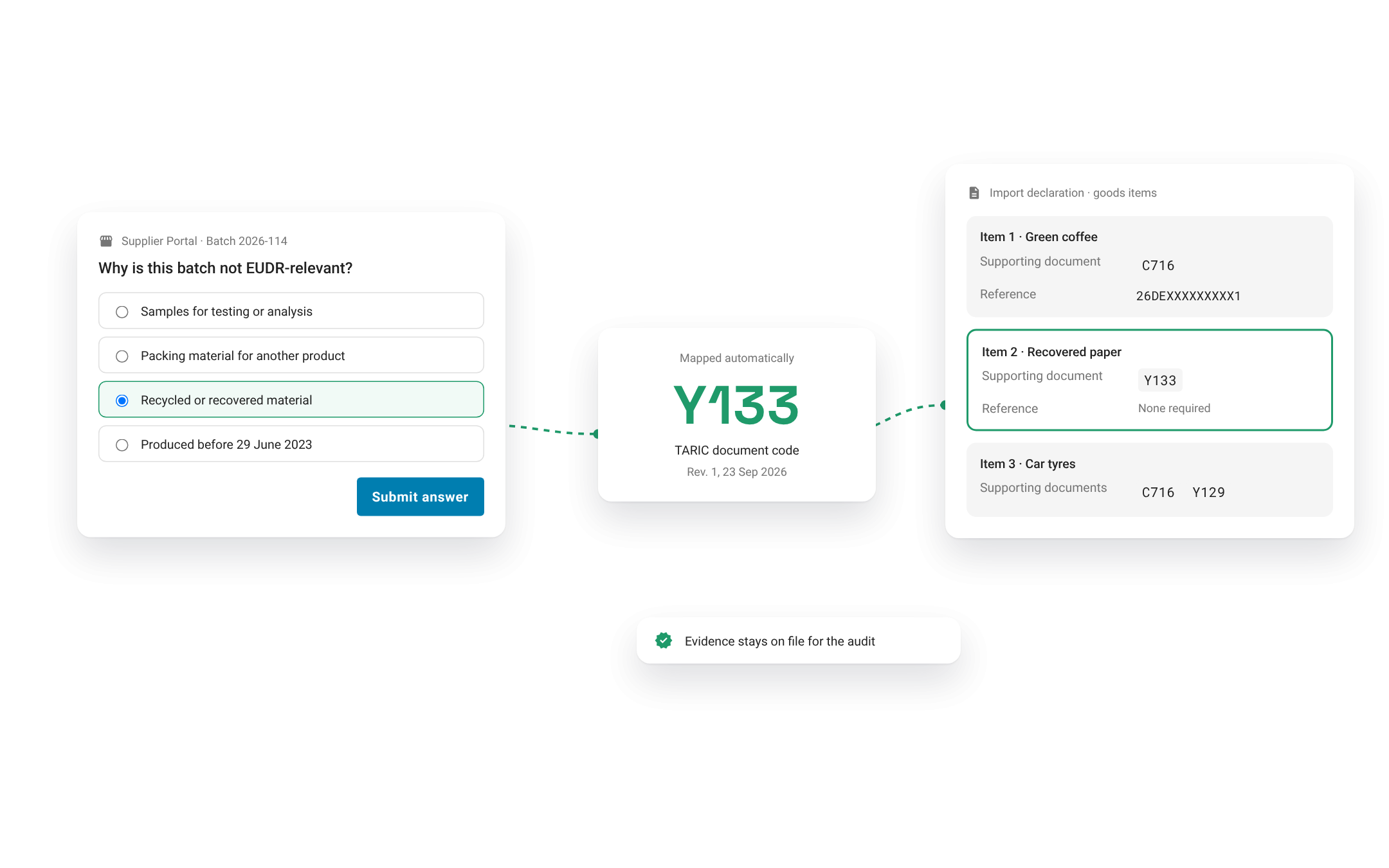
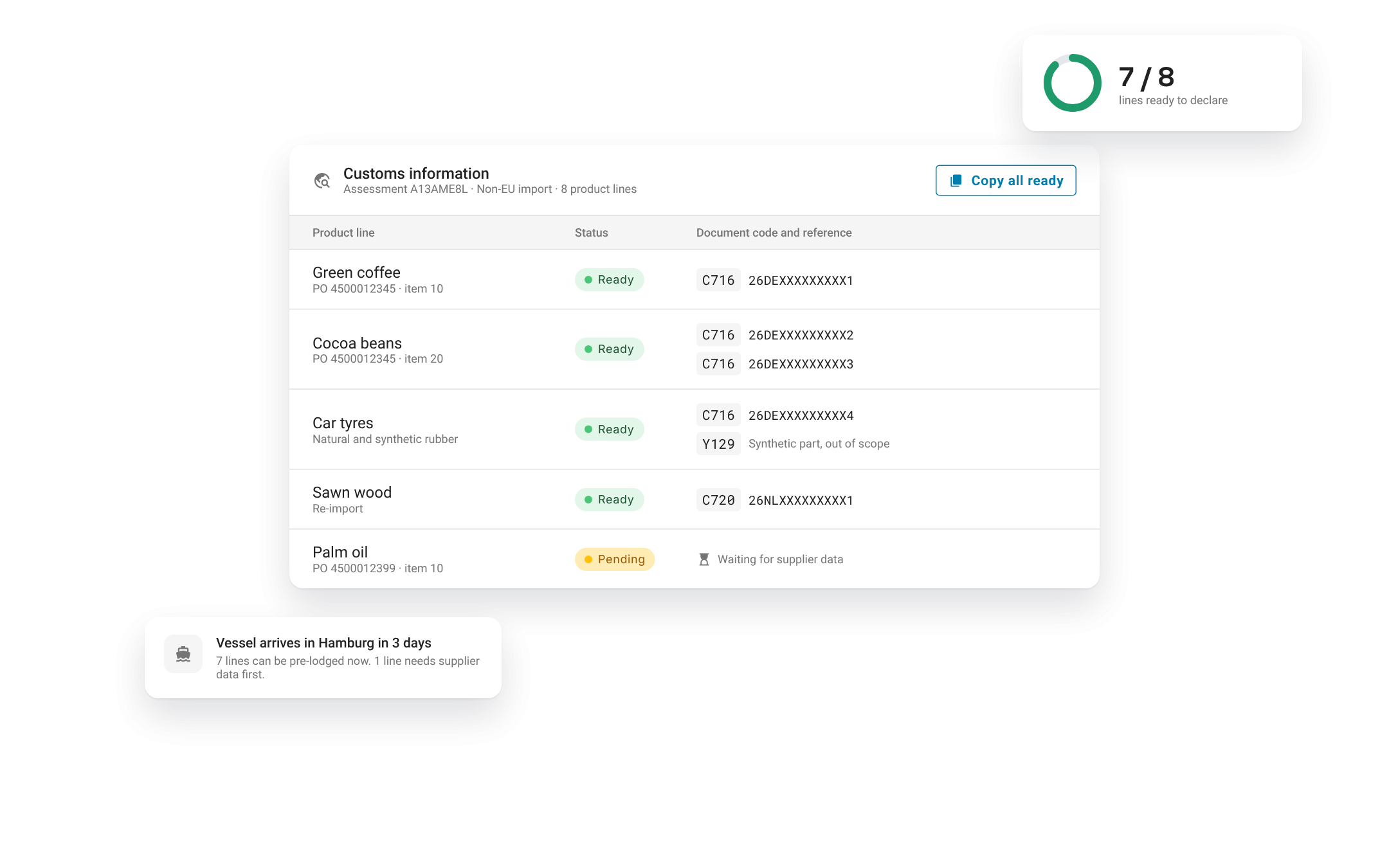
Preparing for customs information for every product line, ready before the vessel docks
From there, the HUB derives the customs information for every product line automatically. The operator sees at a glance gaps days before the broker lodges the declaration, not when the goods are already in temporary storage.
Sharing customs data with the declarant
When your company prepares the declaration
Your trade compliance team works in your own systems, so the DDS data should be there too. The HUB syncs reference numbers, verification numbers and the applicable TARIC document code back to your systems via API or the SAP connector.
For companies that prepare the declarations by hand, the HUB keeps it simple. Search by purchase order, supplier or product to find the right shipment and export the TARIC document code, DDS reference number and verification number easily – copy the values straight into the declaration, or export them to Excel.
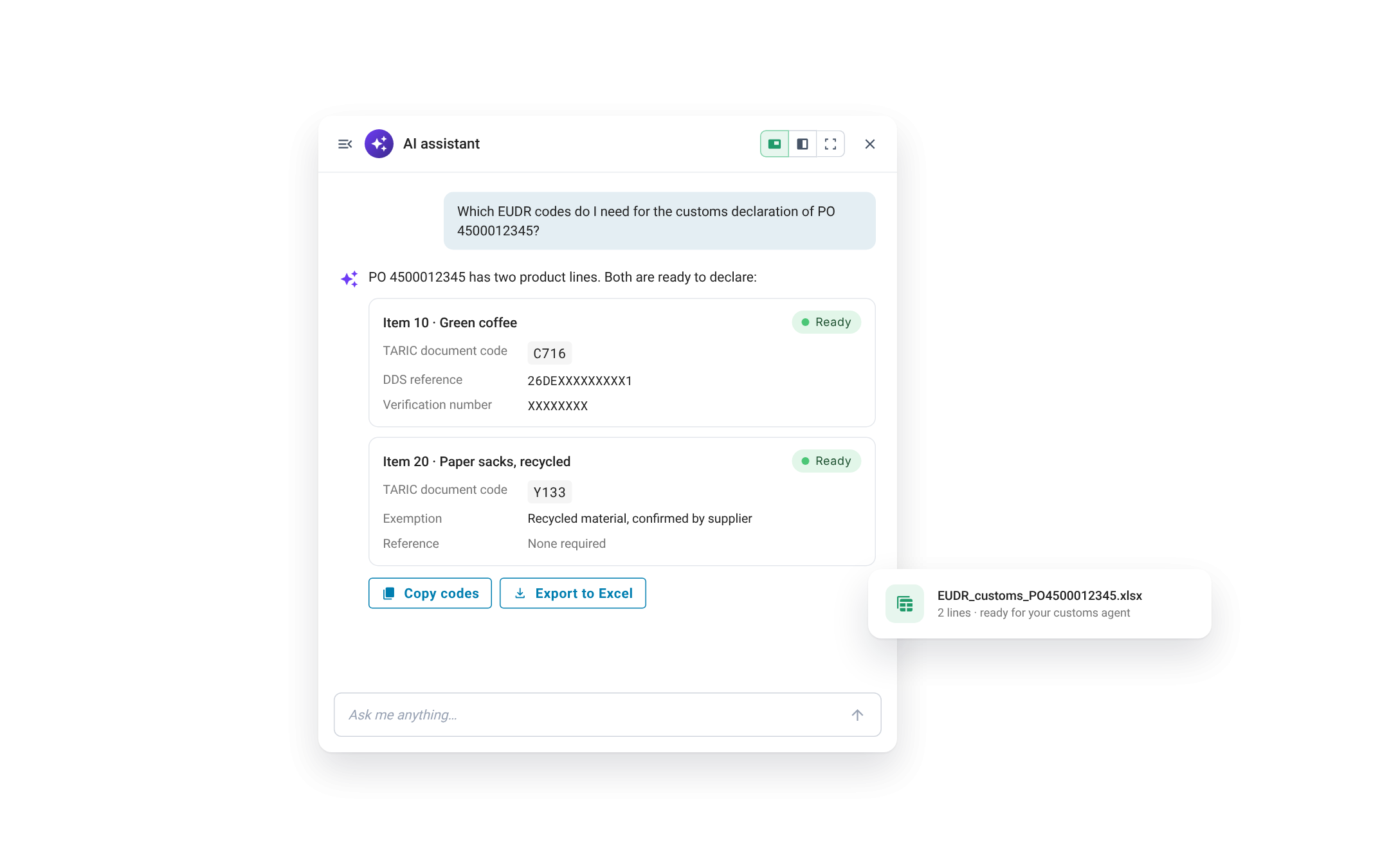
When a forwarder, supplier or other third party prepares the declaration
Here the challenge is sharing. Each partner needs the numbers for its own shipments.
The osapiens Customer Portal lets you share DDS reference numbers selectively with customers and freight forwarders. Each forwarder can access their shipments. Smaller forwarders log in through the browser or subscribe to email notifications. Larger logistics providers connect through an API and automate the data straight into their own customs systems.
For partners who prefer files, the same data is available as an Excel export you send along with the shipment documents. Every row carries the reference and verification number, the TARIC document code and the purchase order and item, so the declarant can match each DDS to its shipment.
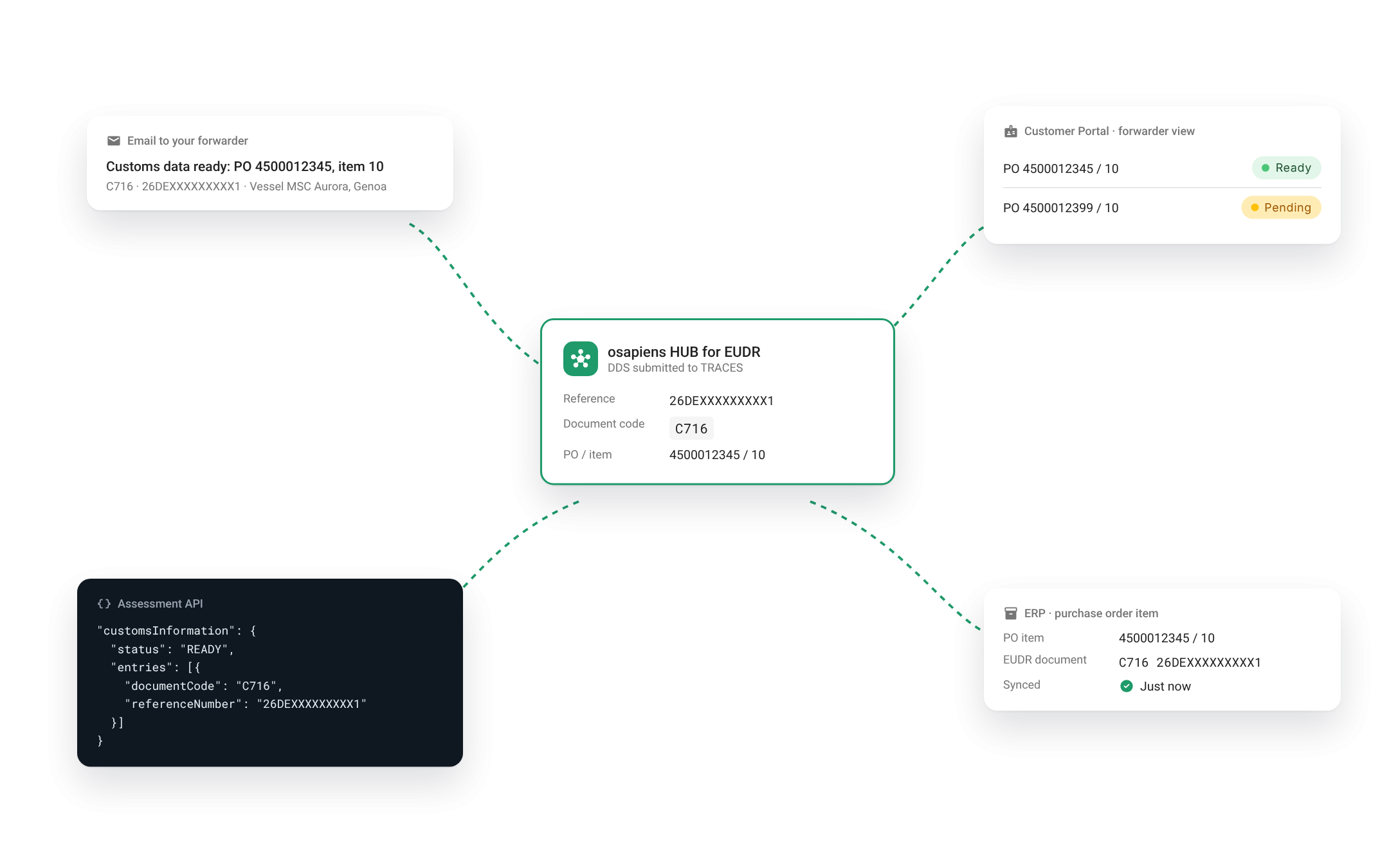
The osapiens HUB automates the EUDR part of the customs declaration end to end. It matches each shipment to the DDS that covers it, determines the correct TARIC document code, including the exemption cases, and hands complete, consistent data to whoever lodges the declaration.
EUDR documentation: preparing for customs checks
A correct declaration is the first test. The second comes when customs or a national competent authority asks for evidence. Operators must keep due diligence records for five years, and authorities can request them at any point.
The osapiens HUB Document Management collects shipment documents, product specifications and supplier evidence, validates them with AI and links each one to its product, supplier, and shipments. Recycled-content certificates, production dates and upstream DDS references sit right next to the line that declared the exemption. Verified documents can be exported in one click and attached to a customs declaration.
When an authority sends detailed questions, the Audit Agent in the osapiens HUB for EUDR assembles the answer. It pulls the relevant DDS, the underlying risk assessment and the verified transactional documents for the shipment in question, so your team responds in hours – not weeks.
Be ready before the first shipment
With the osapiens HUB for EUDR, DDS reference number, TARIC document codes, and supporting documents reach customs teams, freight forwarders, and ERP systems in time for declaration, reducing manual coordination and the risk of customs delay.
Book a demo to see how the osapiens HUB for EUDR automates customs data preparation and helps prevent shipment delays.